Your logbook should tell you
what is left.
SoloTrack tracks FAR 61.109 progress, 90-day currency, signatures, imports, and exports so PPL students can see what is left before the checkride.

What SoloTrack is, in one paragraph
SoloTrack is a native iOS flight logbook designed for student pilots from pre-solo through checkride. It combines fast flight logging with real-time tracking against the FAA's Part 61 private-pilot requirements: the six FAR 61.109 aeronautical-experience categories, FAR 61.57 day/night/instrument currency, and the FAR 61.56 flight review window. Daily use works fully on-device with no account required; iCloud sync is available as an opt-in.
SoloTrack is not a flight planner, EFB, or replacement for instructor judgement. It is a logbook focused on accurate hours, clear progress, and clean records you can hand to a CFI or DPE.
See real PPL progress at a glance
Know exactly where you stand on every FAR 61.109 requirement. SoloTrack breaks down Total Time, Solo, Dual, Cross-Country, Night, and Instrument hours with visual progress bars and a training checklist.
- All 6 FAR 61.109 requirement categories
- Training checklist per FAR 61.109(a)
- Overall progress percentage & hours-to-go

Log every flight in under a minute
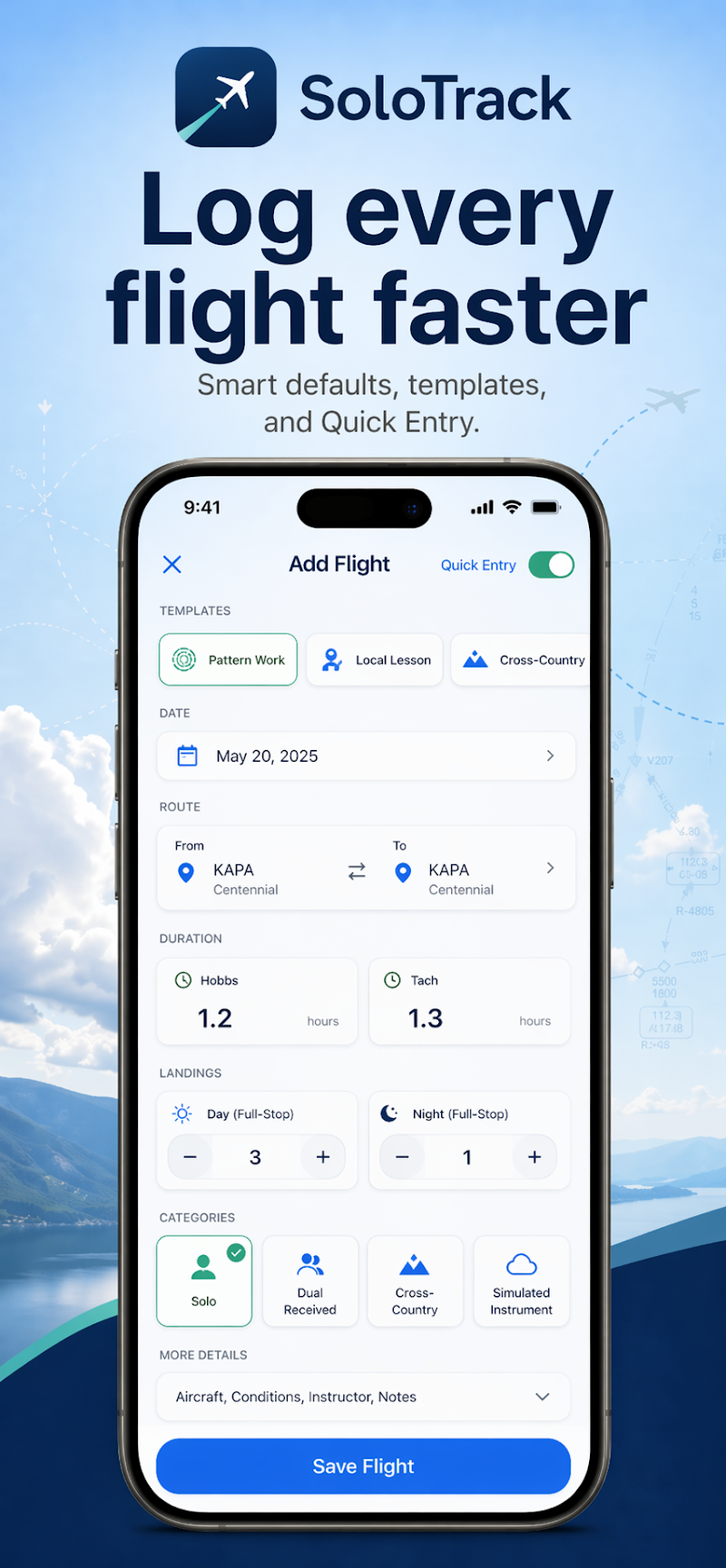
Smart defaults, templates for Pattern Work, Local Lesson, and Cross-Country flights, plus Quick Entry mode. Just pick a template, confirm the details, and save.
- One-tap templates for common flight types
- Hobbs & Tach time, landings, categories
- Airport identifiers with route mapping
Time flights as you fly
Start a session before takeoff and SoloTrack records everything in real time. The Live Activity and home screen widget keep your session visible at a glance, then one tap prefills your logbook entry.
- iOS Live Activity on your lock screen
- Home screen widget with live stats
- One-tap prefill from session to logbook

Stay checkride-ready
Capture CFI signatures digitally, log advanced training details like instrument approaches, holding procedures, and course tracking. Endorsed flights are locked and tamper-proof.
- Digital CFI signature capture (PencilKit)
- Advanced training fields (approaches, holds, XC distance)
- Endorsed & locked flight records

Import, export, and sync
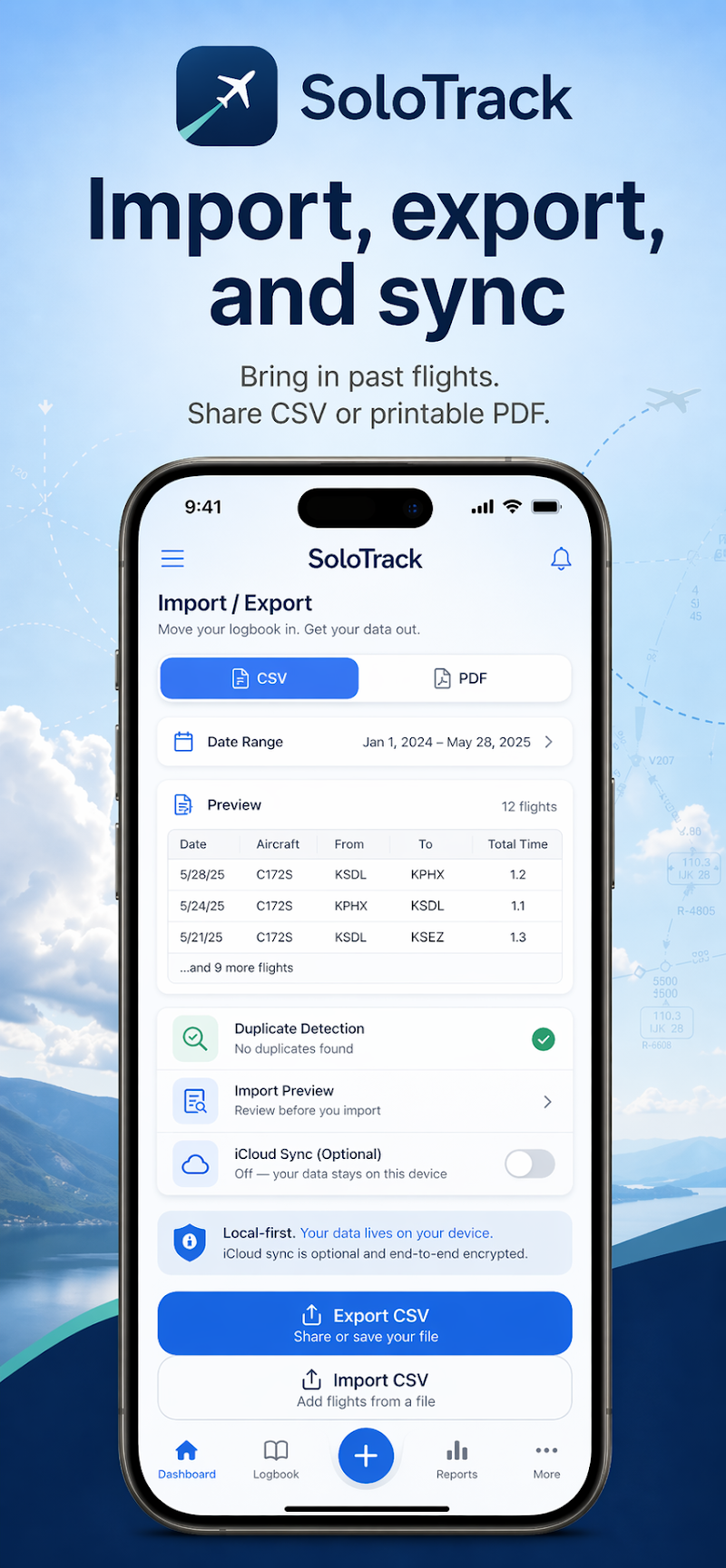
Bring in past flights from CSV, export to PDF for your CFI, and optionally sync across devices with iCloud. Duplicate detection prevents double entries, and your data stays local-first.
- CSV import with duplicate detection
- CSV & PDF export for printable logbooks
- Optional iCloud sync via CloudKit
Frequently asked questions
What platforms does SoloTrack support?
Does SoloTrack work offline?
How does iCloud sync work?
What FAA requirements does SoloTrack track?
How does SoloTrack Pro work?
How is my data handled?
Request a SoloTrack Pro beta offer code.
SoloTrack is already on the App Store. Student pilots, CFIs, and recent PPLs can request an individual App Store offer code for full Pro access while testing real training workflows.
Student pilot and CFI feedback cohort
Use this form to request access, especially if you came from WAI Phoenix or another aviation group. We send one code/redemption link per qualified tester so the beta stays focused on active training feedback.
SoloTrack is now available on the App Store.
Free to download for iPhone and iPad. SoloTrack Pro unlocks the full FAR 61.109 progress, currency, live sessions, signatures, and checkride-ready exports.